
Doctor Deep — install from the Chrome Web Store
AI assistant for doctors that analyses the medical chart in real time directly in your EMR's UI. Shows scores for completeness, standards compliance, treatment plan and recommended clinic services.
AI may work inaccurately with your EMR
If chart analysis is off or the sidebar can't read your fields — email us at ceo@pillovr.com and we'll adapt the extension to your EMR for free.
- — Chromium-based browser: Google Chrome, Microsoft Edge, Brave, Arc or Yandex Browser
- — 1 minute of your time
Install from the Chrome Web Store
Click the button below — it opens the extension page in the Chrome Web Store
Install from Chrome Web StoreOpen the store page
Click the button above or follow the link to the Doctor Deep extension page in the Chrome Web Store.
Add to Chrome
On the store page click «Add to Chrome».
Confirm the installation in the popup. The extension will install automatically — no additional steps needed.
Verify it works
Open your clinic's EMR and go to any patient chart.
The Doctor Deep sidebar will appear on the right. Within seconds the audit with scores and recommendations will start showing up.
Configure language, specialties and standards
In the sidebar click the gear icon ⚙️ next to the "Check" button — the settings panel will open.
- Mode — DocMed (evidence-based) or another analysis profile
- Country / standards — UAE (DHA), RU, EU, etc.
- UI language and output language — EN / RU / AR
- Analyze mode — on demand or auto
- Specialties — tick the ones used in your clinic
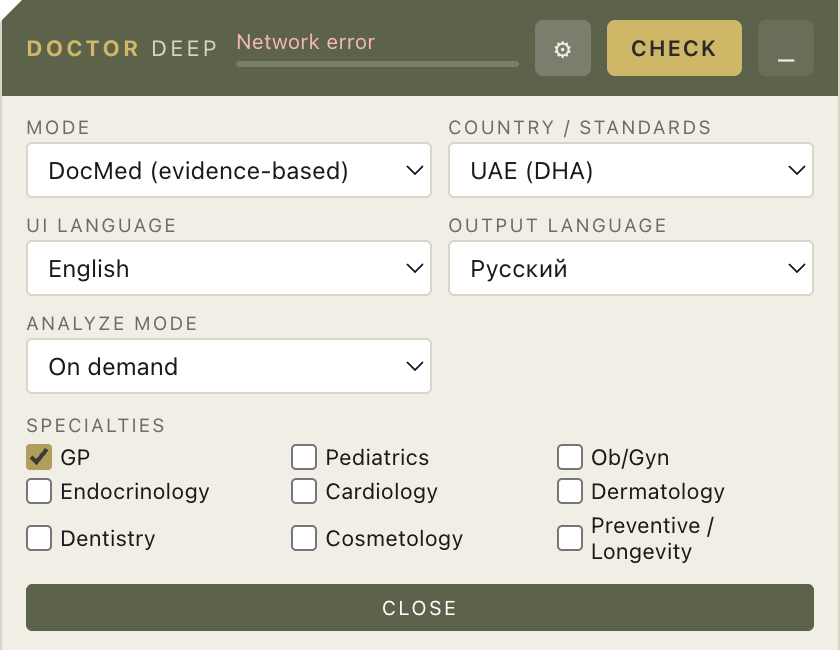
Settings are saved automatically and applied to the next analysis.
- Sidebar didn't show up at all
- Reload the page (Ctrl+R / Cmd+R). Make sure you're on the EMR page — the assistant intentionally doesn't appear on other domains.
- Stuck on 'Waiting for chart content'
- That's normal until the chart is opened or while it's nearly empty. Open a specific patient chart and fill in a couple of fields.
- 'Connection error'
- Wait a minute and click ↻. If it persists — check your internet, restart the browser.
- Extension icon disappeared
- Open chrome://extensions/, make sure Doctor Deep is there and the toggle is on.
Install issues? Email ceo@pillovr.com